The short answer
An applicant tracking system rarely rejects you for a secret score. It parses your resume into a candidate profile, applies the employer's knockout questions, and then lets recruiters search and filter applicants by titles, skills and keywords. To get through, submit a clean, single-column, text-based resume that a parser can read, answer screening questions accurately, and mirror the job's real language where it honestly describes your experience.
On this page
01What an ATS actually does with your resume
An applicant tracking system (ATS) is the software employers use to run hiring: it posts jobs, collects applications, stores candidates and moves them through stages like New, Screen, Interview and Offer. Workday, Greenhouse, Lever, iCIMS, SmartRecruiters, SAP SuccessFactors and Oracle's Taleo are common names, and plenty of smaller companies use lighter tools built into their HR software.
The popular picture is a robot that reads your resume and throws it in the bin. The reality is more ordinary and, once you understand it, easier to work with. When you apply, the system does roughly three things:
- Parses your file: it extracts the text and tries to split it into fields such as name, contact details, job titles, employers, dates, education and skills.
- Records your answers to the application form, including any screening or knockout questions the employer set up.
- Puts you in a pool where recruiters review, search, filter and sort applicants. Some platforms also suggest a match or ranking, depending on how the employer has configured them.
Each of those steps is a place where a good candidate can quietly drop out of view. None of them is beaten with tricks. They are beaten with a resume that is easy to read, clearly relevant and honest.
02The three gates: parsing, knockout questions and recruiter search
Gate 1: Parsing
If the parser misreads your resume, everything downstream suffers. A job title that lands in the wrong field, dates that can't be read, or skills trapped inside a text box can make your profile look thinner than it is. Recruiters often see the parsed profile, a preview of your file, or both, and search runs on the extracted text. Common causes of bad parsing are multi-column layouts read in the wrong order, tables, text boxes, icons used instead of words, contact details placed in the document header, and scanned or image-only PDFs.
Gate 2: Knockout questions
This is where most automatic rejections really happen. Employers can add required questions such as Are you authorized to work in this country?, Will you now or in the future require sponsorship?, Do you have a valid nursing license? or How many years of experience do you have with Salesforce? An answer outside the required range can move you straight to a rejected or held status, regardless of how good your resume is.
Gate 3: Recruiter search and filters
Once you're in the pool, a recruiter decides who to look at. On busy roles they sort by date, filter by location or answers, and search for titles and skills, for example "product manager" AND (B2B OR SaaS) AND SQL. If the words they search for don't appear in your resume, you won't come up, even if you have the experience. Newer platforms add AI features that summarize candidates or suggest matches, but they still depend on what your resume actually says.
| Gate | What can go wrong | What fixes it |
|---|---|---|
| Parsing | Columns read out of order, skills in a table lost, contact details in the header missed | Single-column layout, plain section headings, real text (not images), contact details in the body |
| Knockout questions | A required answer doesn't match the employer's criteria | Read each question carefully, answer accurately, and skip roles with hard requirements you don't meet |
| Recruiter search | Your resume uses different words than the posting and the recruiter's search | Use the job's own terms for skills and titles where they truthfully describe your work |
03ATS myths vs facts
A lot of ATS advice online was written to sell something. Here is what holds up and what doesn't.
Myth
- Every ATS gives your resume a score and auto-rejects anything under a cut-off.
- You need a plain, ugly text resume to pass.
- PDFs can't be read by an ATS.
- Pasting the job description in white text will get you to the top.
- Stuffing in as many keywords as possible raises your ranking.
- One perfect resume works for every application.
Fact
- Most rejections come from knockout questions or human review. Ranking and match features exist on some platforms, and how they are used varies by employer.
- Clean and readable is the goal. Simple, well-designed single-column templates parse well.
- Text-based PDFs parse well in most modern systems. Use Word if the posting asks for it.
- Hidden text shows up in the parsed text, and recruiters who notice it usually treat it as a red flag.
- Recruiters read what search surfaces. Unnatural repetition hurts you once a human looks.
- Small, honest tailoring to each posting's language makes you show up in more searches.
04A step-by-step checklist to get past the ATS
- 1
Start from a single-column, text-based layout
Use a template that keeps your main content in one column, with real text rather than images or icons. Avoid tables and text boxes for anything important. See the ATS resume format guide for the full rules.
- 2
Use standard section headings
Summary, Experience (or Work Experience), Education, Skills, Projects, Certifications. Creative headings like Where I've Made an Impact make the parser guess.
- 3
Put contact details in the body
Name, email, phone, city and a LinkedIn or portfolio link belong at the top of the page as normal text, not in the document's header or footer area, which some parsers skip.
- 4
Write dates the same way everywhere
Pick one format, such as
Mar 2023 – Present, and use it for every role. Mixed formats make it harder to calculate your experience. - 5
Match the job title and core skills honestly
If the posting says Customer Success Manager and your title was Client Partner for the same work, you can write
Client Partner (Customer Success). Name the tools and skills the posting asks for in your Skills section and show them in action in your bullets. More on this in resume keywords that get you hired. - 6
Lead bullets with results
Search gets you found, but a person still decides. Cut month-end close from 8 days to 5 by automating reconciliations in Python beats Responsible for month-end close every time.
- 7
Answer screening questions carefully
Read each knockout question twice. Answer accurately about authorization, sponsorship, licenses and years of experience. If you clearly don't meet a hard requirement, your time is usually better spent on another role.
- 8
Check the file before you send it
Open your PDF and try to select and copy the text. If you can't, an ATS can't read it either. Then run it through an ATS analyzer to catch the problems you can't see by eye.
05How to check your resume with the Resume Sketch ATS analyzer
The Resume Sketch ATS analyzer reads your actual file the way a parser would and tells you what to fix, ordered by impact. It works without an account (usage is rate-limited), so you can check a resume before you decide anything else.
- 1
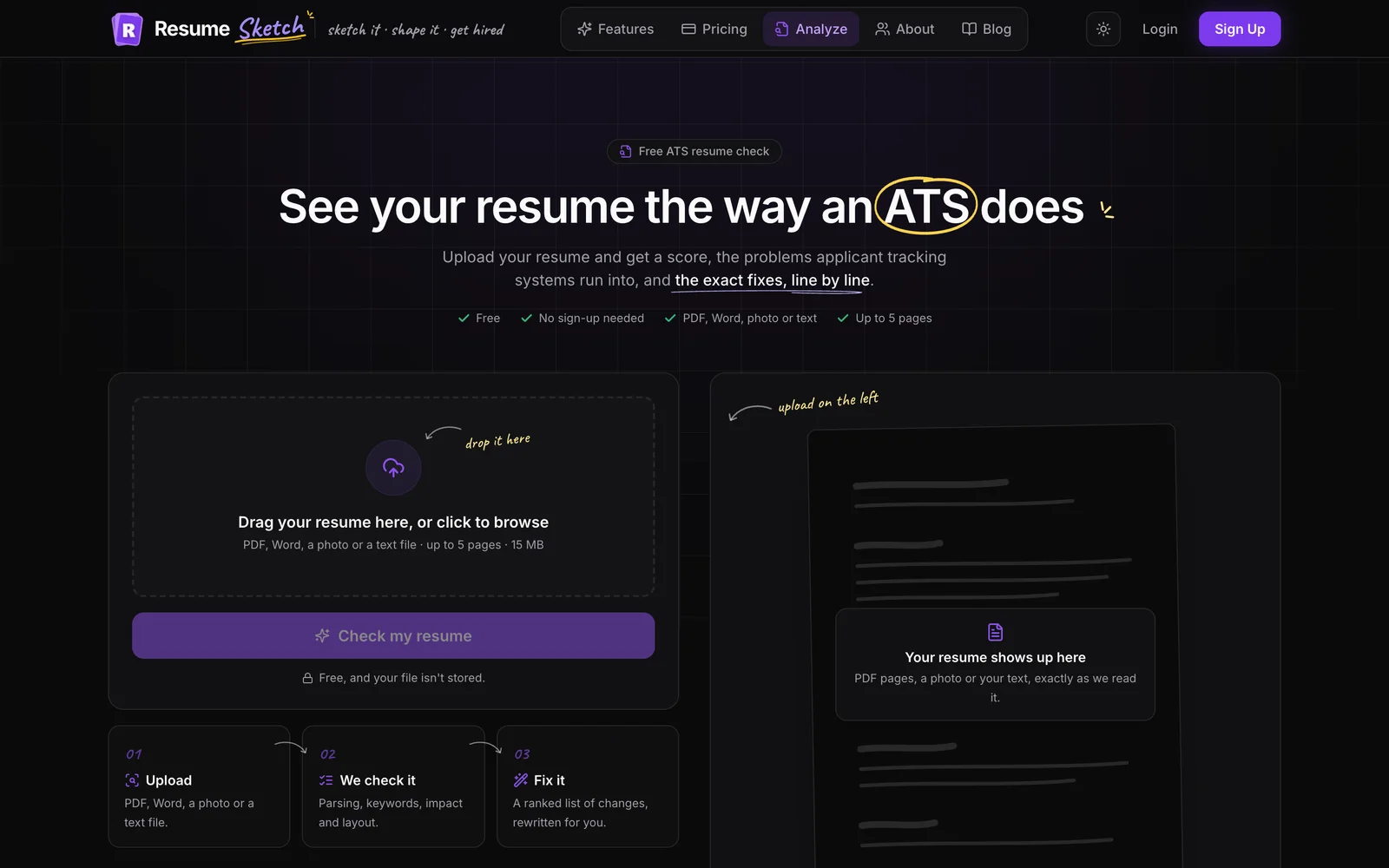
Open the analyzer and upload your resume
Go to the ATS analyzer and drop in your file. It accepts PDF, Word, a photo or a text file, up to 5 pages.
- 2
Wait for the analysis
It usually takes 30 to 60 seconds. You'll see live progress as it reads the layout and sections, checks how an ATS parses it, measures keywords and impact, and writes your fixes.
- 3
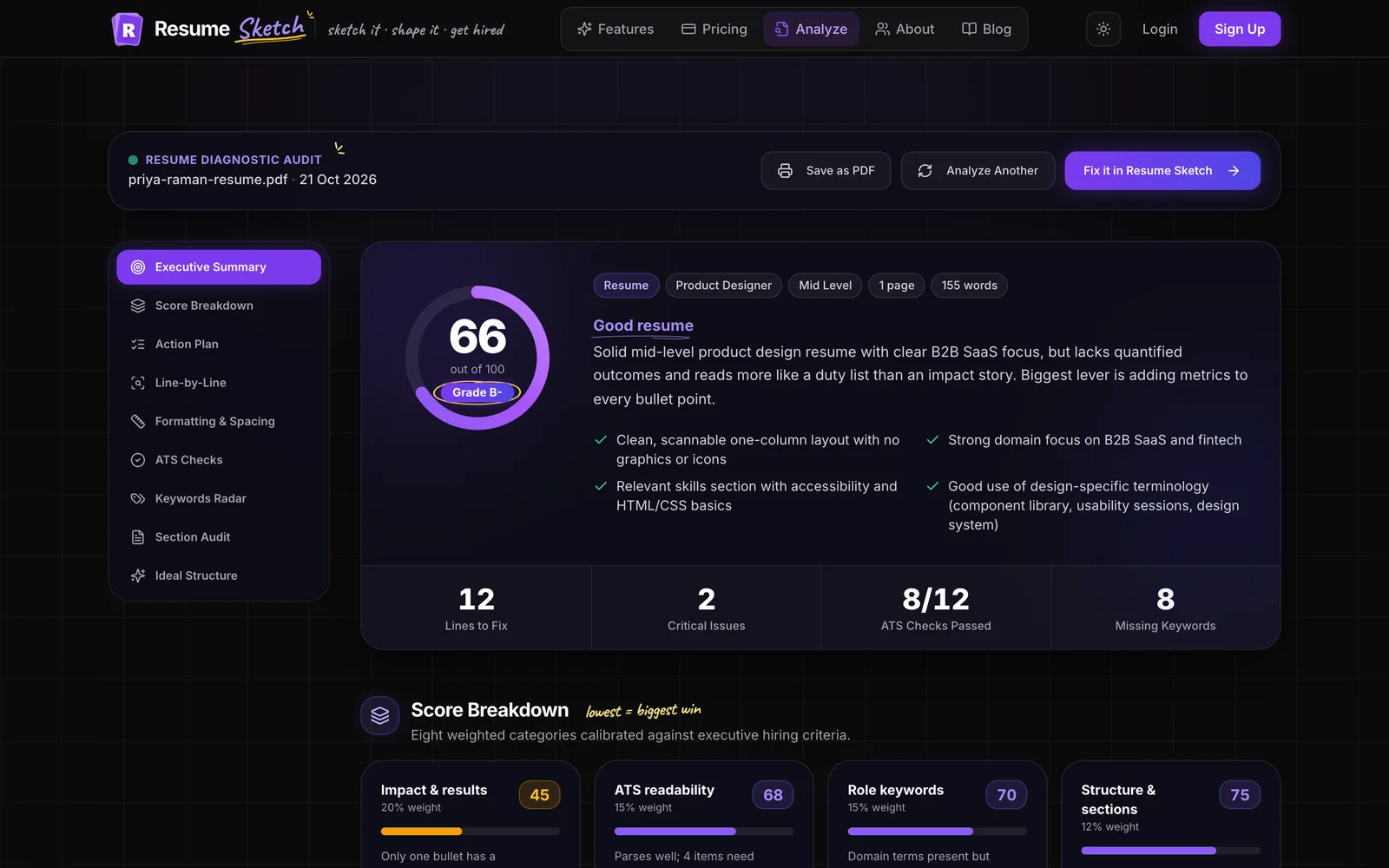
Read the score and breakdown
You get an overall score out of 100, built from eight weighted areas: impact and results, ATS readability, role keywords, structure and sections, formatting and spacing, language and clarity, contact and essentials, and length and density. The lowest areas are usually your biggest wins.
- 4
Work through the fixes
The report covers ATS parsing checks, formatting measured from your document (fonts, margins, columns, date formats), a keywords radar showing which terms you already have and which are missing, a section-by-section audit, and line-by-line rewrites you can copy.
For a full walkthrough of every part of the report, read the ATS resume analyzer guide. When you're ready to tune a resume for one specific posting, add the job as a target job in the editor and follow how to tailor your resume to a job description.
06Getting seen beyond the ATS
An ATS is one door, not the only one. Referrals are often flagged or routed differently inside these systems, and a short, specific message to a recruiter or hiring manager can get your application opened sooner. If you apply and also reach out, make sure the person sees the same strong, tailored resume the system has.
- Ask former colleagues at the company whether they can refer you before you apply.
- Send a brief note to the recruiter or hiring manager that names the role and one concrete result relevant to it. Resume Sketch can draft this for you: see the cold email guide.
- Share your resume as a link when you reach out, so you can see whether it has been opened. The share link guide explains how.
Frequently asked questions
Does an ATS automatically reject resumes?
Sometimes, but usually because of knockout questions rather than resume content. If you answer a required question outside the employer's criteria, such as work authorization or a required license, the system can move you to a rejected status automatically. Most other decisions are made by people using the ATS to search, filter and review.
Is a PDF or Word file better for an ATS?
Text-based PDFs parse well in most modern systems and keep your layout intact. If the posting or portal specifically asks for a Word document, follow that instruction. Never submit a scanned or image-only PDF.
Can an ATS read two-column resumes?
Many can, but some read columns in the wrong order, mixing your skills into your job history. A single-column layout is the safer choice, especially for large employers whose systems you can't test in advance.
How many keywords should my resume have?
There is no magic number. Include the core skills, tools and titles from the posting that genuinely describe you, list them in your Skills section, and show the most important ones in your experience bullets. Write for a person, not a counter.
Is the Resume Sketch ATS analyzer free?
You can use the analyzer without an account, with usage limits to prevent abuse. Resume Sketch also has a free plan, plus paid Pro and Max plans for heavier AI use. See the pricing page for current details.