The short answer
The best AI resume builder is the one that produces an ATS-safe file, writes in your voice from your real facts, tailors to each job, and lets you download without a paywall. Resume Sketch is our pick for most job seekers in 2026 because it combines all of that with a free plan that includes unlimited PDF downloads. Teal, Rezi, Kickresume and Enhancv are solid alternatives depending on what you value most.
On this page
- 01The short answer
- 02Why the choice of builder matters more than it used to
- 03How to evaluate an AI resume builder: 8 criteria
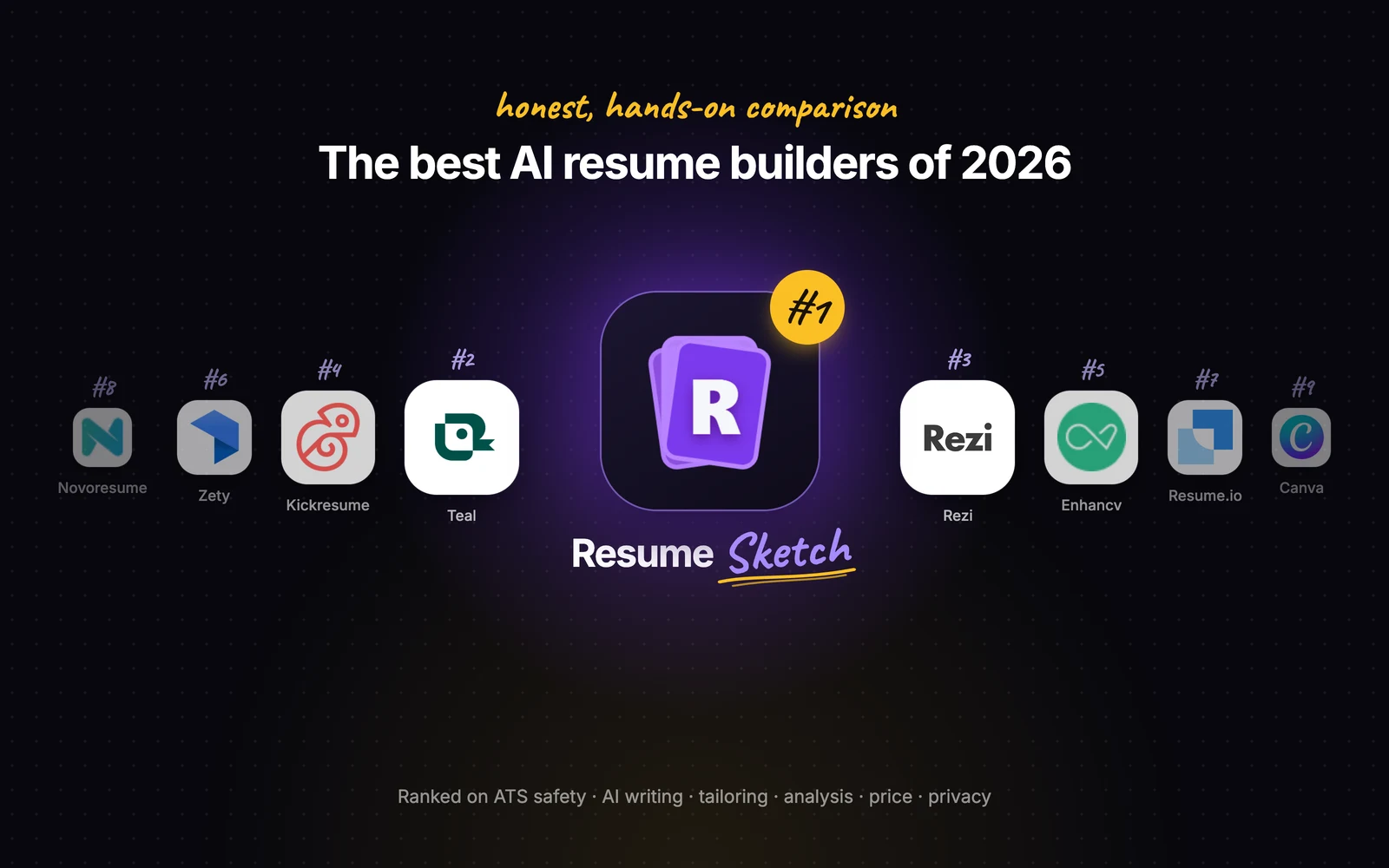
- 04The best AI resume builders of 2026, ranked
- 05Side-by-side comparison
- 06How to choose for your situation
- 07What Resume Sketch costs, plainly
- 08Try the top pick in ten minutes
- 09FAQ
01Why the choice of builder matters more than it used to
Almost every resume builder now has an AI button, but they behave very differently once you paste in a real career. Some generate polished but generic bullets. Some produce designs that applicant tracking systems (ATS) struggle to read. Some let you build for an hour and then ask for payment at the download step. So before the ranking, here is how to judge any builder yourself.
02How to evaluate an AI resume builder: 8 criteria
Use these eight questions on any tool, including ours. Spend ten minutes with a free plan and a real job description, and most of the answers become obvious.
- ATS-safe output. Does the exported PDF have selectable text, a single logical reading order, standard section headings and no key details hidden in images or text boxes? Run the export through an ATS checker to find out.
- Quality of the AI writing. Does it rewrite your actual experience into clear, specific bullets, or does it invent responsibilities and fill space with buzzwords? Good AI asks for numbers rather than making them up.
- Tailoring. Can you paste a job description and have suggestions aimed at that role, without rewriting your whole resume by hand each time?
- Analyzer or scoring. Is there a way to check the result before you send it: how it parses, what is missing, how well it matches the role?
- Templates. Are the templates clean and readable by software, with enough variety for your field (for example a photo layout where that is the norm, or a dense one-page design for engineering)?
- Export and download freedom. Can you download a PDF on the free plan, or only after paying? Is there a watermark?
- Privacy. Who can see your resume, is anything shared with recruiters by default, and is your data sold?
- Price model. Monthly subscription, one-off fee, credits, or bring-your-own AI key? Make sure you understand what happens when a trial ends.
03The best AI resume builders of 2026, ranked
Rankings reflect how well each tool serves a typical job seeker who needs an accurate, ATS-friendly resume, tailored to several applications, at a reasonable cost. Your own priorities may reorder the middle of this list, and that is fine.
Resume Sketch
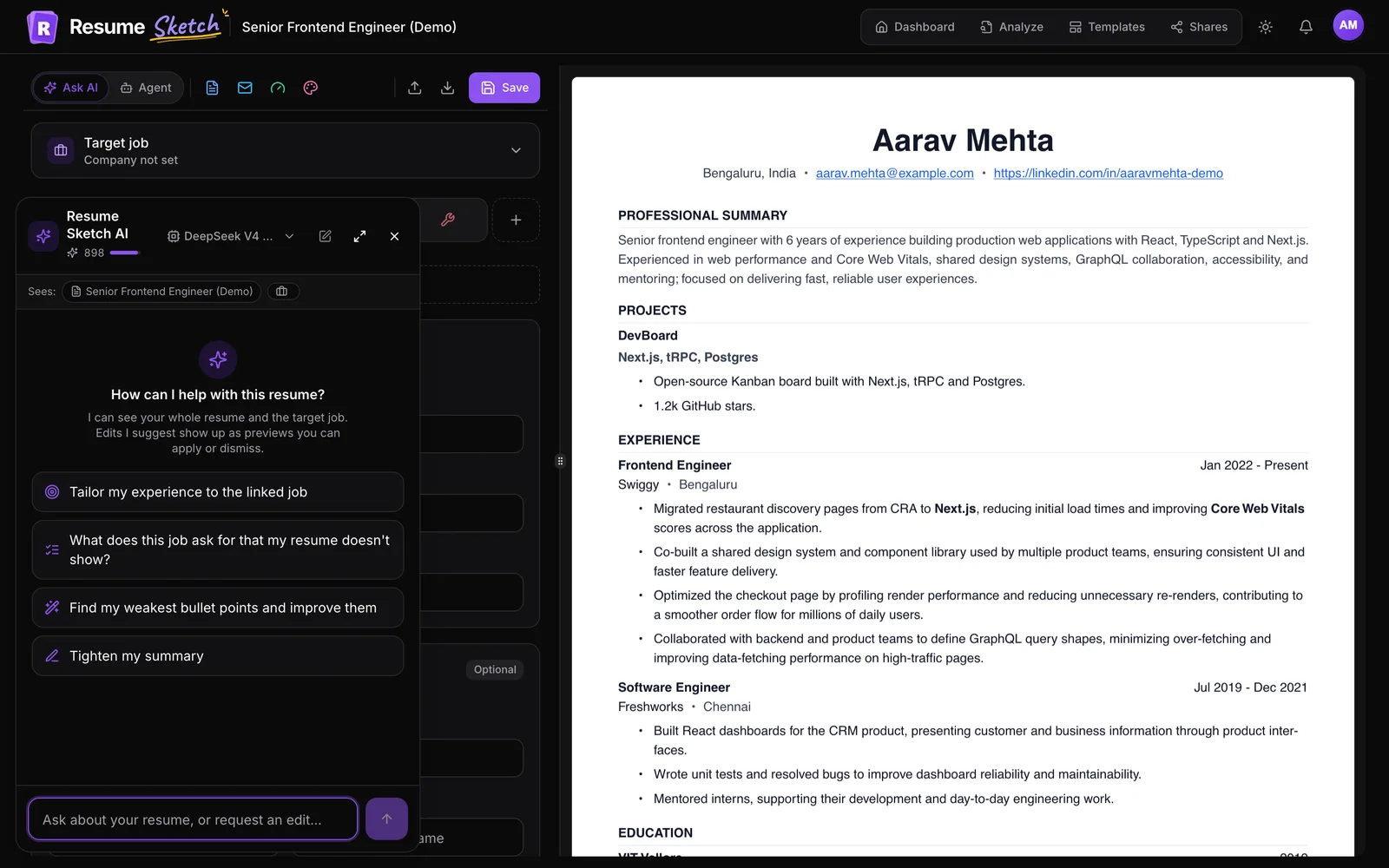
Best for: Job seekers applying to several roles who want tailored, ATS-safe resumes without a download paywall.The most complete AI workflow for the price: a master profile, an AI assistant that sees your whole resume and target job, a built-in ATS analyzer, and unlimited PDF downloads even on the free plan.
- Store your experience once in a profile and create new resumes from it
- Ask AI chat (Cmd/Ctrl+J) rewrites bullets and summaries, with edits shown as previews you accept or reject
- Add a target job and AI suggestions tailor to that role
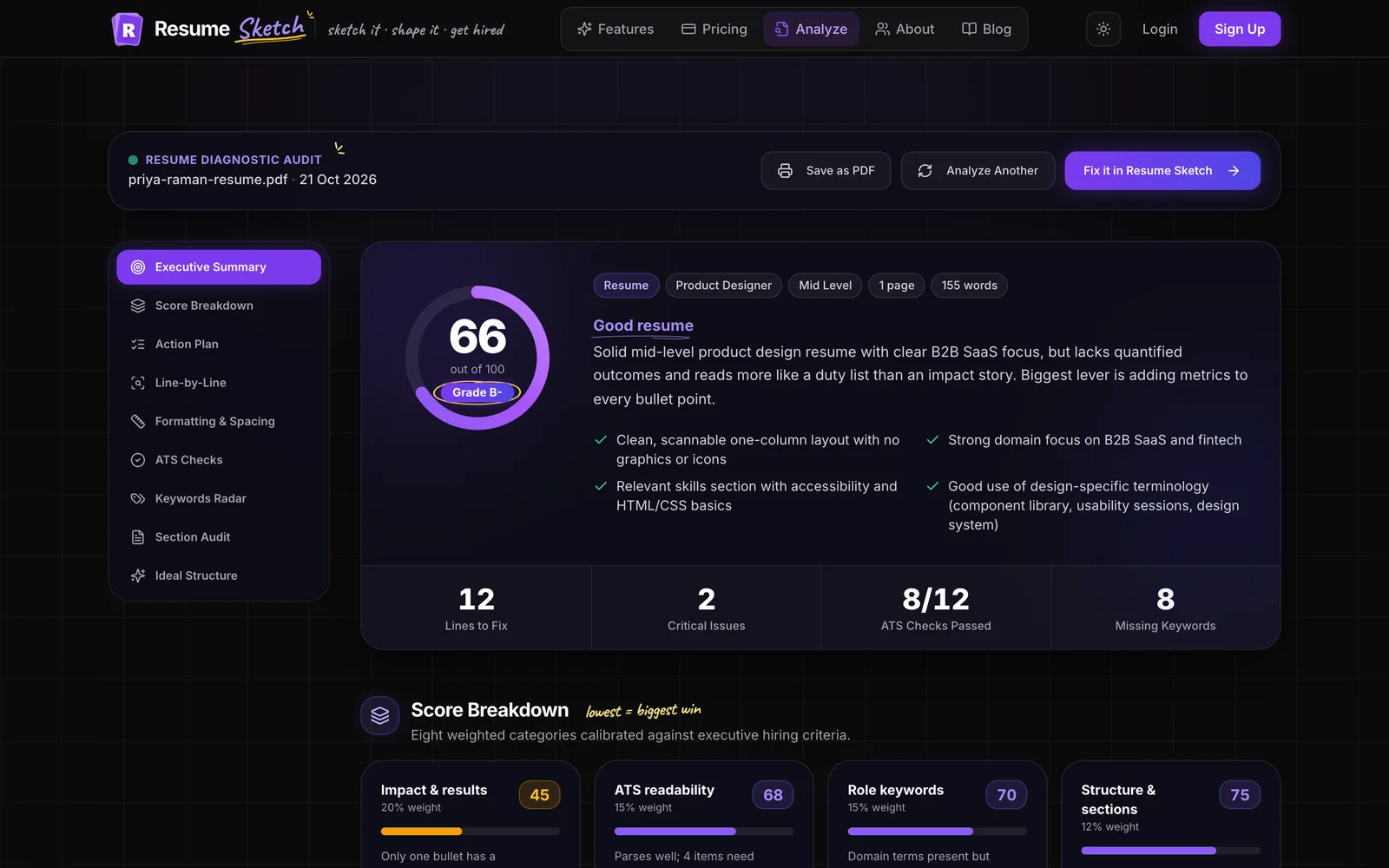
- Free ATS analyzer with an overall score, parse view and prioritised fixes
- Many ATS-friendly templates, including photo and role-based designs
- Unlimited PDF downloads on the free plan, plus cover letters and share links with view counts
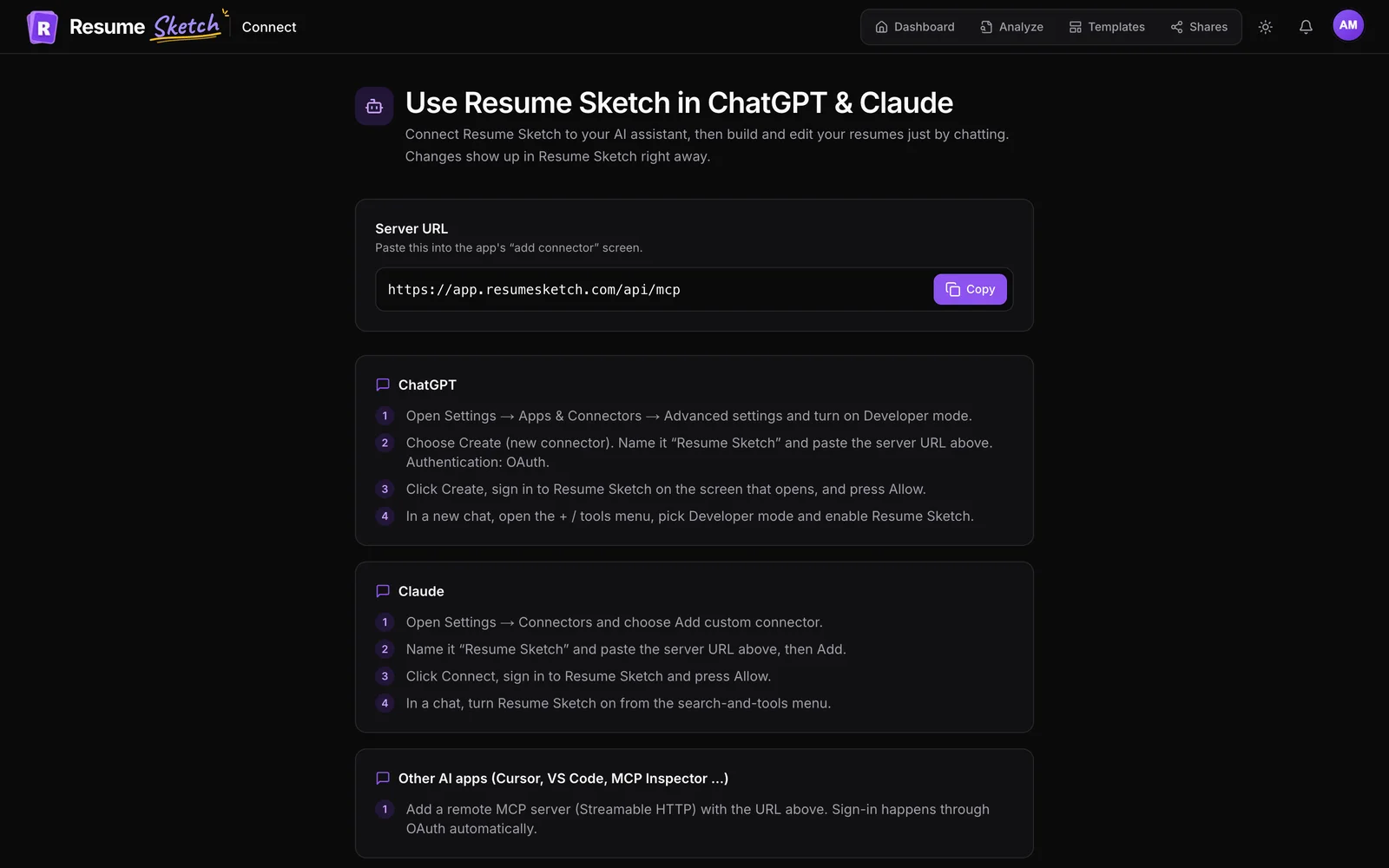
- Works from inside ChatGPT and Claude through a connector, without using Resume Sketch credits
- Agent mode (multi-step edits across the whole resume) and sending cold emails through Gmail are Pro and Max only
- Newer brand, so there are fewer third-party reviews and community templates than older tools
- Free plan is capped at 2 resumes, 1 live share link and 250 AI credits a month
- Exports PDF only, and it is focused on the resume itself rather than tracking job applications

Teal
Best for: Active job seekers who want to track many applications alongside their resumes.A strong choice if you want your resume builder and job-search organiser in one place. Its strength is the overall workflow around applications.
- Resume building is tied closely to managing your job search
- Helps you compare your resume against job descriptions
- Well known, with plenty of tutorials and community content
- The number of features can feel like a lot if you only need a resume
- Some of the more useful AI features may sit behind a paid plan, so check current pricing
Rezi
Best for: Applicants to large employers that rely heavily on ATS screening.Built with ATS compatibility front and centre. A sensible pick if your main worry is software screening.
- Clear focus on ATS-friendly structure and keyword coverage
- AI help for writing bullets and summaries
- Simple, readable layouts
- Design options are more conservative than design-led tools
- Free usage is limited in some areas, so check what the current plan includes

Kickresume
Best for: First-time resume writers and students who want a good-looking result quickly.A polished, beginner-friendly builder with attractive templates and AI writing help for resumes and cover letters.
- Approachable interface and well-designed templates
- AI writing help for both resumes and cover letters
- Example content to get you past a blank page
- Some templates are more decorative, so test the export in an ATS checker
- Premium templates and features may require a paid plan

Enhancv
Best for: Candidates who want a distinctive, modern look and are applying where design is appreciated.Design-forward and content-aware. Good for showing personality and achievements, especially in creative or startup roles.
- Modern layouts with flexible sections
- Content suggestions that push you toward achievements
- Good for roles where a resume can stand out visually
- Multi-column, visual layouts need an ATS check before you use them widely
- Full access generally requires a paid plan, so check current pricing
Zety
Best for: People who want to be walked through each section with suggested phrases.A guided, step-by-step builder with lots of templates and pre-written suggestions. Easy to use, but read the pricing terms closely.
- Very guided flow, section by section
- Large template library
- Pre-written content you can adapt
- Pre-written phrases can make resumes sound generic if you do not personalise them
- Downloading may depend on a paid plan or trial, so confirm the terms before you start

Resume.io
Best for: Experienced professionals who already know what to say and want a tidy layout fast.Clean, simple and quick. A good option if you want a neat resume without many decisions.
- Straightforward editor
- Professional, restrained templates
- Fast to finish a single resume
- Lighter on deep tailoring and analysis than AI-first tools
- Download and plan terms vary, so check the current pricing page

Novoresume
Best for: Students and early-career applicants who want a clean, structured resume.Tidy templates and a clear editor, aimed at getting a clean one-page resume done.
- Clear, well-organised templates
- Helpful content tips as you write
- Easy to keep to one page
- AI features are less central than in AI-first builders
- Some layouts and features may be part of a paid plan
Canva
Best for: Designers and creative roles where the resume is judged by a person, often alongside a portfolio.Excellent for visual design, less ideal as a resume tool. Beautiful layouts can hide text in shapes and columns that parsers misread.
- Huge design flexibility
- Many visual templates
- Familiar tool for many people
- Not built around ATS parsing, so heavily designed exports can parse poorly
- No resume-specific guidance on content, tailoring or scoring

ChatGPT (used directly)
Best for: Drafting and rewriting content that you then put into a proper template.A powerful writing partner, not a resume builder. Great for drafting and brainstorming, but you still need a layout, an ATS check and a place to keep versions.
- Flexible, conversational rewriting
- Good at summarising a job description
- Useful for interview prep too
- No ATS-tested templates or export by default
- Can invent achievements or numbers if you do not give it real facts
- Versions for different jobs are easy to lose across chats
04Side-by-side comparison
A quick summary of core capabilities. For Resume Sketch we state what the product does today. For other tools, Varies means it depends on the plan or has changed over time, so check before you rely on it.
| Tool | AI writing | Job tailoring | ATS check / score | ATS-friendly templates | Free PDF download |
|---|---|---|---|---|---|
| Resume Sketch | Yes | Yes | Yes | Yes | Yes (unlimited) |
| Teal | Yes | Yes | Partial | Yes | Varies |
| Rezi | Yes | Yes | Yes | Yes | Varies |
| Kickresume | Yes | Partial | Varies | Varies | Varies |
| Enhancv | Yes | Partial | Varies | Varies | Varies |
| Zety | Partial | Partial | Varies | Varies | Varies |
| Resume.io | Partial | Partial | Varies | Yes | Varies |
| Novoresume | Partial | Partial | Varies | Yes | Varies |
| Canva | Partial | Partial | Varies | Varies | Varies |
| ChatGPT (direct) | Yes | Yes | Partial | No templates | Varies |
05How to choose for your situation
You are applying to many roles at once
Prioritise tailoring and speed. A master profile plus a target job per resume is the efficient setup: you keep one source of truth and spin out a focused version for each application. This is where Resume Sketch is strongest. Our guide to tailoring a resume to a job description walks through it.
You are worried about ATS screening
Pick a builder with plain, single-column or clearly structured templates, then verify with an analyzer. Rezi and Resume Sketch both lean into this. Whatever you choose, read how to beat the ATS in 2026 before you apply.
You are in a creative field
Design-led tools like Enhancv or Canva can help you stand out with a human reader. Keep a simpler, ATS-friendly version for online applications and use the designed one for direct emails and portfolio links.
You are a student or writing your first resume
You want guidance and a free plan that actually lets you download. Kickresume and Novoresume are friendly, and Resume Sketch's free plan includes unlimited PDF downloads and enough AI credits to write a strong first resume.
06What Resume Sketch costs, plainly
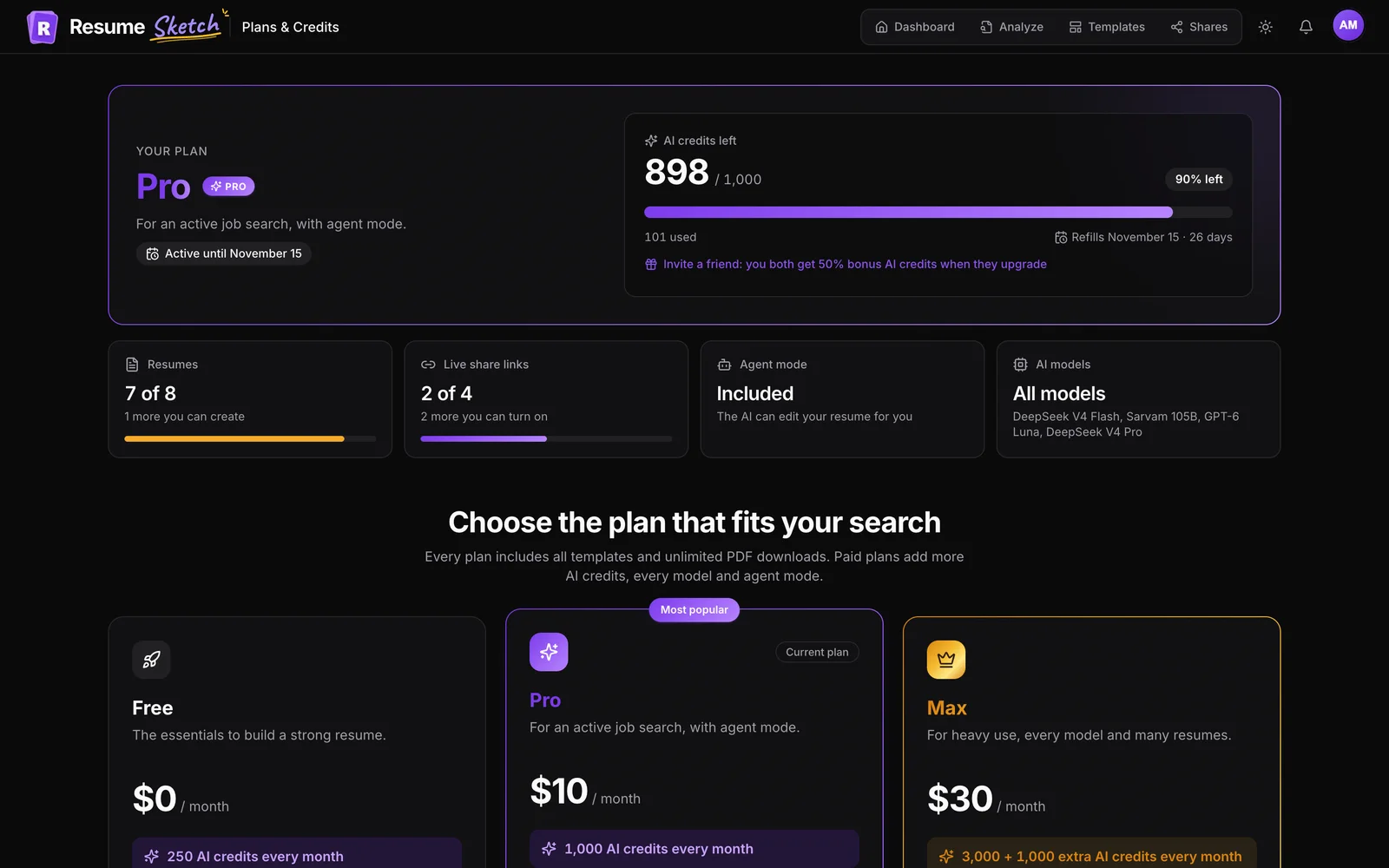
Because we ask you to check everyone else's pricing, here is ours. Free is $0 with 250 AI credits a month, 2 resumes, 1 live share link and unlimited PDF downloads. Pro is $10 a month with 1,000 credits, every AI model, agent mode, Gmail sending, 8 resumes and 4 share links. Max is $30 a month with 3,000 credits plus 1,000 extra, 20 resumes and 20 share links.
Credits refill each monthly cycle and do not roll over. You can also add your own API key (OpenAI, Anthropic, xAI, DeepSeek or Groq) so requests do not use credits; the key is stored only in your browser. On privacy: your data is not sold, and sharing your starred resume with recruiters is strictly opt-in. Details are on the pricing and privacy pages.
07Try the top pick in ten minutes
Create your profile (or import an old resume into it), create a resume from it, paste a job description into the target job card, ask the assistant to find your weakest bullets, then run the result through the ATS analyzer before you download.
Frequently asked questions
What is the best AI resume builder in 2026?
For most job seekers we recommend Resume Sketch, because it combines tailoring, a built-in ATS analyzer, ATS-friendly templates and unlimited free PDF downloads. Teal suits people who want a job tracker in the same tool, and Rezi suits people focused mainly on ATS screening.
Is there a truly free AI resume builder?
Several tools have free tiers, but some limit downloads or features. Resume Sketch's free plan includes unlimited PDF downloads, 2 resumes and 250 AI credits a month. Always check what a free plan lets you export before you invest time.
Are AI resume builders ATS-friendly?
Many are, but it depends on the template, not just the tool. Single-column or clearly structured layouts with standard headings parse best. Test your exported PDF in an ATS checker before you apply.
Can I just use ChatGPT instead of a resume builder?
You can use ChatGPT to draft content, but you still need a layout, an ATS check and a way to manage versions. You can also connect Resume Sketch to ChatGPT or Claude and get both in one place.
Will recruiters know my resume was written with AI?
They notice generic writing, not the tool. If your bullets contain your real projects, numbers and context, the resume reads as yours. Always review and edit AI suggestions before you accept them.